
You know that moment when your Reels go from “this is so me” to “why is my phone obsessed with this random thing”? Instagram’s new Your Algorithm feature is Instagram’s newest launch that tries to fix that exact spiral, by letting you peek at what Instagram thinks you like and actually edit it. Instead of quietly training Instagram’s algorithm feature with every scroll, you can open Instagram’s Your Algorithm and nudge your feed back toward your real interests. It’s a small switch in the interface, but it changes the whole vibe of how recommendations feel. (The Verge)
At-a-Glance
- Your Algorithm lives inside Reels and shows the topics Instagram thinks shape your recommendations. (TechCrunch)
- You can tell Instagram what you want more of or less of, topic by topic, instead of just tapping Not Interested on single videos. (WIRED)
- The feature rolled out starting December 10, 2025 in the US. (The Verge)
- Instagram uses AI to summarize your interests based on your activity, and you can remove interests if it gets it wrong. (ABC News)
- Instagram has also talked about expanding this kind of control beyond Reels, including Explore. (TechCrunch)
Methodology
- Kept it grounded in what Instagram says you can tap right now inside Reels, not rumors or screenshots that can age overnight. (TechCrunch)
- Prioritized reporting that included clear rollout timing and interface specifics like the icon and where it appears. (ABC News)
- Treated availability as a rolling release, since “live” can mean different things depending on region and account. (The Verge)
.webp)
What Instagram’s new Your Algorithm feature actually does
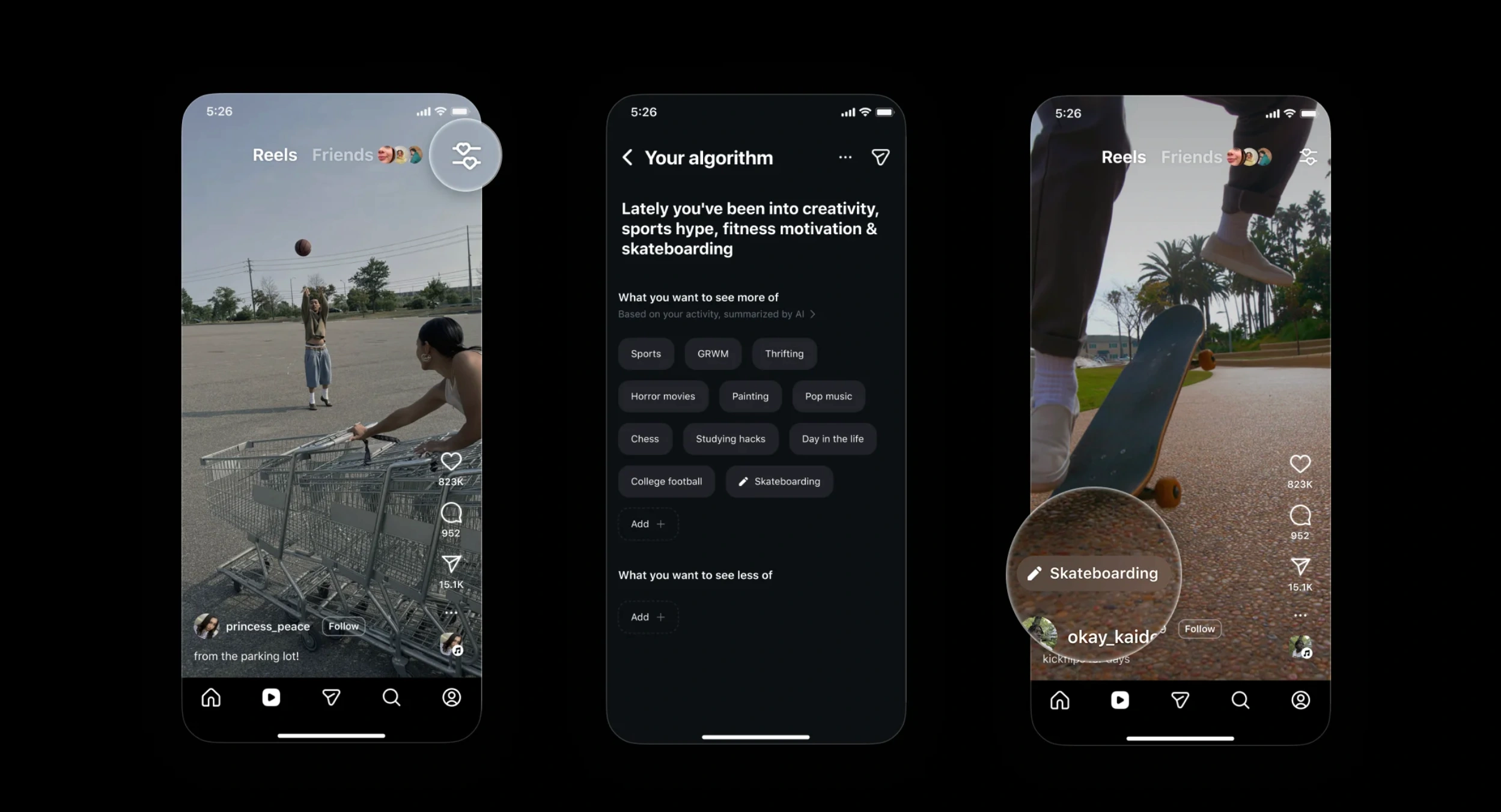
At its core, Instagram’s new Your Algorithm feature is a personalized topic dashboard for Reels. It shows an AI-generated snapshot of what you’ve been “into” lately, then lists the topics Instagram believes are driving what you see next. The point is simple: your interests shift, but your feed often stays stuck, and this gives you a direct way to update the signal. It’s also a rare moment of transparency from a feed that usually feels like a black box.
- You get a topic list based on your activity, summarized with AI. (ABC News)
- You can adjust recommendations by choosing topics you want more or less often. (WIRED)
Where to find Instagram’s Your Algorithm inside Reels
The magic is tucked into a tiny icon, and that’s almost the point, because it’s meant to be used while you’re already watching. Open Reels, then look to the top right for the new control icon described as two lines with hearts. Tap it and Instagram’s Your Algorithm opens, showing your interests and the topics list you can tune. If you don’t see it yet, it may simply mean your account hasn’t been included in the rollout. (ABC News)
- Location: Reels tab, upper right corner icon (two lines with hearts). (TechCrunch)
- Launch timing: reported as rolling out starting December 10, 2025 in the US. (WIRED)
How to tune Instagram’s algorithm feature without overthinking it
The most useful mindset here is “teach the feed like a playlist,” not “perfect the feed forever.” Start by removing a handful of topics that feel like an accidental rabbit hole, then add a couple that match what you actually want more of right now. Instagram’s algorithm feature adapts based on these topic signals, so you’re not just swatting away one weird Reel at a time. And yes, there’s a social layer too: Instagram lets you share the AI summary of what you’re into, which turns your preferences into a little personality postcard. (TechCrunch)
- You can dial topics up or down, and even add a topic if it isn’t listed. (TechCrunch)
- You can share your interests summary to Stories. (The Verge)

What Instagram’s newest launch does not promise
This isn’t a return to a simple, chronological Reels feed, and it’s not a “delete the algorithm” button either. Instagram’s newest launch is closer to a steering wheel than an off switch, so you’re shaping what gets boosted, not rewriting the whole system. The topics still come from your activity, and Instagram still predicts what you’ll watch next, but now you can correct the prediction when it starts drifting. Think of it as making the algorithm less stubborn, not making it disappear. (WIRED)
- It’s topic-level control, not full control over ranking or reach. (The Verge)
- It’s currently framed around Reels first, with brand expansion discussed for other surfaces later. (TechCrunch)
.webp)
Why creators and brands should care about Instagram’s algorithm feature
When users can edit topics directly, relevance starts to matter in a more literal way. A Reel that gets lumped into the “wrong” interest bucket might get quietly filtered out by people who are pruning their feeds, even if the video is well-made. On the flip side, creators who are consistently associated with a few clear topics can benefit when viewers actively turn those topics up. It’s the same old battle for attention, but now the audience has a few more knobs to turn. (The Verge)
- Viewers can influence what they see more or less of, topic by topic. (WIRED)
- Instagram positions this as making recommendations feel more tailored as interests change. (The Verge)

What’s next after Instagram’s Your Algorithm rollout
Instagram has pointed to bringing this kind of tuning beyond Reels, including Explore, and even hinted at broader “shape your feed” controls across Meta’s apps. That matters because once people get used to editing their recommendations in one place, they’ll expect it everywhere. Meta has also talked about making it easier to give feedback on why a post or Reel isn’t relevant, which fits the same direction: less mystery, more direct input. If this keeps expanding, the most powerful habit might simply be checking in on your topics the same way you clean up your Following list.
- Instagram has discussed bringing Your Algorithm-style controls to Explore. (TechCrunch)
- Meta has separately described expanding algorithm feedback tools in the Feed experience. (Meta Newsroom)
FAQ
Where is Instagram’s Your Algorithm located?
It’s inside the Reels tab, accessed from a new icon in the upper right corner that’s been described as two lines with hearts. Once you tap it, Instagram’s Your Algorithm opens a dashboard of your inferred interests and topic controls, so you can choose what you want more or less of. (ABC News)
Can you add your own topics inside Instagram’s algorithm feature?
Yes, reporting on Instagram’s algorithm feature says you can add a topic even if it doesn’t already appear in your list. That’s the part that feels most like steering, because you’re not only reacting to what the app guessed, you’re also declaring what you want next. (TechCrunch)
Does Instagram’s newest launch change your whole Instagram feed or just Reels?
Instagram’s newest launch is being framed around Reels first, and expansion to other surfaces like Explore has been discussed as a next step. So the practical effect right now is about what shows up in your Reels recommendations, not a full reset of everything you see elsewhere in the app. (TechCrunch)
The Why Behind Instagram’s Your Algorithm Moment
Instagram’s Your Algorithm is a quiet admission that people are tired of feeling dragged by their own feeds. Instagram’s new Your Algorithm feature does not promise perfection, but it does give you a clearer way to say “this is me” and “this really isn’t,” without playing whack-a-mole on individual posts. If Instagram’s algorithm feature keeps expanding into more parts of the app, the real shift won’t be technical, it’ll be emotional: recommendations that feel chosen start to feel less invasive. And honestly, isn’t that the whole point of a feed, to reflect you as you change, not trap you in a version of yourself from three months ago?

%2520(1).png)
.png)